
Best Free SD Card Recovery Tools for Windows & Mac

Accidentally losing precious files from an SD card can be a nightmare, especially when those files are irreplaceable photos, videos, or documents. Whether it’s a memory card from your camera, a microSD from your phone, or a drone SD card, unexpected data loss happens to everyone. Fortunately, in 2025, there are several free SD card recovery tools that can help restore your lost data safely on both Windows and Mac. In this guide, we’ll explore the best free SD card recovery tools, discuss their features, and give you step-by-step instructions to recover your files efficiently. By the end, you’ll know exactly which tool suits your needs and how to use it effectively.
Why SD Card Data Gets Lost
Before diving into software recommendations, it’s important to understand why SD card data disappears. Common causes include:
- Accidental deletion: The most frequent reason; we often press delete without thinking.
- Formatting errors: Sometimes, SD cards get formatted accidentally or due to a system warning.
- Corruption or virus attacks: Malware, improper ejection, or file system errors can make your SD card inaccessible.
- SD card not detected: Sometimes, the SD card itself is recognized as unmounted, making it appear empty.
Tip: Stop using the SD card immediately after data loss. New data can overwrite lost files, making recovery impossible.
Key Features to Look for in Free SD Card Recovery Software
Choosing the right tool is crucial. Not all free recovery software is safe or effective. Here are the essential features to look for:
- User-friendly interface: Beginners should be able to navigate without confusion.
- Multiple file type support: Photos, videos, documents, and audio files should all be recoverable.
- Compatibility with Windows & Mac: Cross-platform support ensures you can recover files regardless of your operating system.
- Preview before recovery: This allows you to select only the files you want to restore.
- Safety: No software should overwrite your SD card data.
- Scanning speed and recovery success rate: A balance between fast scans and deep recovery is ideal.
Best Free SD Card Recovery Software for 2025
Here are the top free tools tested for Windows and Mac in 2025:
1. WinfrGUI (Windows File Recovery GUI)
Platform: Windows 10/11
Key Features:
- Free, open-source GUI for Microsoft’s Windows File Recovery
- Recover files from formatted or corrupted SD cards
- Supports multiple file types including photos, videos, and documents
- Preview before recovery
Pros & Cons:
- ✔️High success rate on Windows
- ✔️Simple GUI makes it beginner-friendly
- ✔️No installation required
- ❌Windows only
- ❌Advanced options can be confusing at first
Best for: Recovering files from accidentally formatted SD cards or deleted media.
WinfrGUI is one of the best SD card recovery tools available today, providing fast, reliable, and easy-to-use solutions to recover deleted, lost, or corrupted files from your SD cards on Windows.
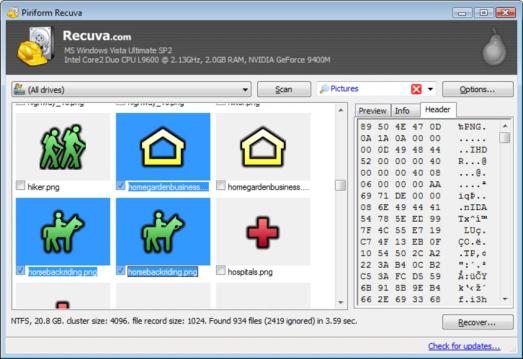
2. Recuva
Platform: Windows
Key Features:
- Quick scan and deep scan modes
- Preview files before restoring
- Secure overwrite option for sensitive files
Pros & Cons:
- ✔️Very beginner-friendly
- ✔️Lightweight and fast
- ✔️Free version supports most recovery needs
- ❌Mac version not available
- ❌Deep scans can take longer on large SD cards
Best for: Casual users looking to recover deleted photos or small files quickly.
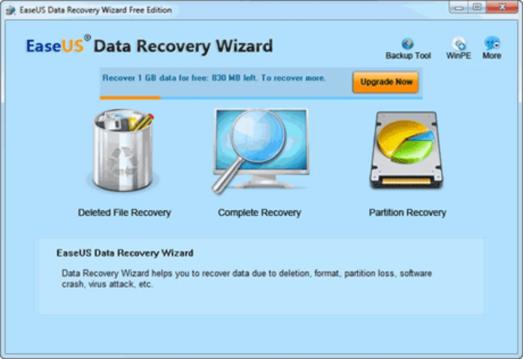
3. EaseUS Data Recovery Wizard Free
Platform: Windows & Mac
Key Features:
- Recover up to 2GB of data for free
- Supports SD cards, USB drives, and hard drives
- Deep scan mode for corrupted or formatted cards
Pros & Cons:
- ✔️Cross-platform support
- ✔️Simple wizard interface
- ✔️Reliable for most recovery scenarios
- ❌Free version has a 2GB recovery limit
- ❌Full version is paid for larger recoveries
Best for: Users who want a simple recovery process on both Windows and Mac.
4. PhotoRec
Platform: Windows, Mac, Linux
Key Features:
- Open-source and completely free
- Works with a wide variety of file systems (FAT, NTFS, exFAT)
- Recovers files even from severely corrupted SD cards
Pros & Cons:
- ✔️Powerful and versatile
- ✔️Cross-platform
- ✔️Works on almost any storage device
- ❌Command-line interface can be intimidating
- ❌No file preview
Best for: Tech-savvy users or situations where other software fails.
5. iBoysoft Data Recovery Free
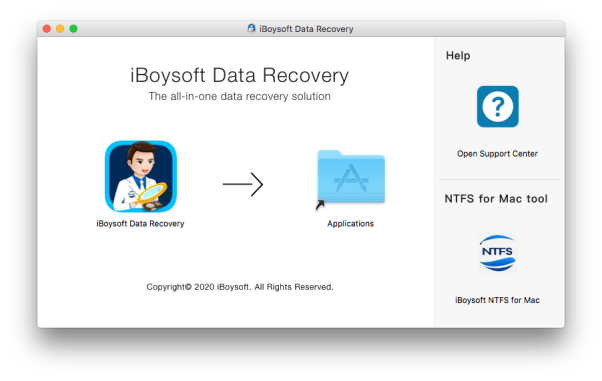
Platform: Windows & Mac
Key Features:
- Recover deleted files, formatted SD cards, and lost partitions
- Preview before recovery
- Simple and modern interface
Pros & Cons:
- ✔️Cross-platform support
- ✔️User-friendly
- ✔️Supports most file types
- ❌Free version limited to 1GB of recovery
- ❌Deep scans can be slow
Best for: Users who want a modern, beginner-friendly solution with cross-platform support.
6. MiniTool Power Data Recovery Free
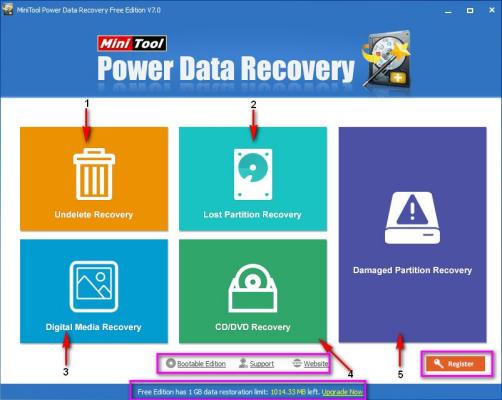
Platform: Windows & Mac
Key Features:
- Recover files from SD cards, USB drives, and hard drives
- Supports deleted, corrupted, and formatted partitions
- Preview files before recovery
Pros & Cons:
- ✔️Straightforward interface
- ✔️Supports multiple recovery scenarios
- ✔️Free version recovers up to 1GB
- ❌Limited free recovery size
- ❌Deep scans can take time
Best for: Users needing reliable free recovery for small to medium-sized SD cards.
How to Recover Files from SD Card Using Free Tools
Let’s use WinfrGUI as an example for a simple recovery workflow on Windows:
Step1: Connect your SD card to your computer via card reader.
Step2: Install and Launch WinfrGUI and select the SD card as the target drive.
Step3: Choose the recovery mode: quick scan for recently deleted files or deep scan for formatted/corrupted cards.
Step4: Preview recoverable files and select what you want to restore.
Step5: Save recovered files to a safe location on your computer (not the same SD card).
Pro Tip: Avoid using the SD card before recovery. Overwriting data reduces the chance of successful recovery, even when using the best SD card recovery tools like WinfrGUI, Recuva, or EaseUS.
FAQs About SD Card Recovery
Q1. Can I recover data from a corrupted SD card?
Yes. Most free software, including WinfrGUI and PhotoRec, can recover files from corrupted or formatted SD cards.
Q2. Is free recovery software safe?
Yes, as long as you download from the official website. Avoid “cracked” versions that may contain malware.
Q3. What if my SD card is physically damaged?
Software can’t fix physical damage. In such cases, consult a professional data recovery service.
Q4. Does Mac have native recovery options?
Mac’s Time Machine can help if you backed up the SD card previously. Otherwise, use cross-platform recovery software like EaseUS or iBoysoft.
Q5. How much data can free software recover?
Most free versions have limits (1–2GB). For larger recoveries, consider the paid version.
Conclusion
Losing data on an SD card can be frustrating, but with the right free recovery software, you can often restore your files safely and quickly. In 2025, tools like WinfrGUI, Recuva, EaseUS, PhotoRec, iBoysoft, and MiniTool provide effective solutions for both Windows and Mac users. By understanding your SD card’s issue, choosing a reliable tool, and following the step-by-step recovery process, you can recover deleted photos, videos, and documents without stress. Remember to back up your data regularly to prevent future losses.
Takeaway: For the best free SD card recovery tools in 2025, pick the one that matches your operating system, file types, and recovery needs — and act fast before lost data is overwritten.
🔗 More Tutorials:
 MyRecover
 FoneTool
