
How to Fix Instagram Password Reset Issues [2026]

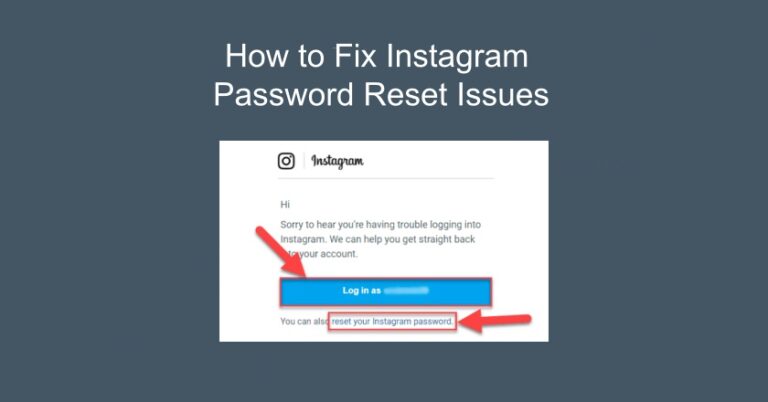
I still remember the cold chill that ran down my spine last Tuesday. I was mid-edit on a reel when my Windows 11 laptop suddenly flashed a “Blue Screen of Death” and plunged into an endless boot loop. When I finally managed to get the system back up, my browser was a ghost town—all my saved sessions were gone. I found myself trapped in a nightmare: I couldn’t remember my auto-generated credentials and was stuck in a frustrating instagram password reset loop. To make matters worse, the local folder where I kept my backup security codes had completely vanished during the crash. That night taught me a hard lesson: account security and local file integrity are two sides of the same coin. This guide is born from that experience, offering you a roadmap to reclaim your social access and recover the critical files you thought were lost forever.
Key Takeaways
- Local Data Dependency: In 2026, an instagram password reset often fails due to corrupted “Trusted Device” tokens or Passkeys on your Windows PC rather than platform-side issues.
- The “Clean” Environment Fix: Purging your browser cache or switching to an Incognito window can bypass identity verification blocks caused by outdated or faulty cookies.
- Network and DNS Isolation: Resetting your local IP via a mobile hotspot and using the
ipconfig /flushdnscommand prevents Instagram’s security AI from flagging your recovery attempts as “automated behavior.” - Biometric Bypass: If email recovery fails, the “Video Selfie” verification is the most reliable way to prove your identity and bypass expired or broken reset links.
- System Clock Sync: Ensure your Windows system time is perfectly synchronized in settings; even a 60-second discrepancy can cause SSL certificate errors and invalidate recovery tokens.
- Recovering Backup Codes: If a system crash wiped your local text files containing security codes, WinfrGUI is a 100% free tool that can scan your drive to restore these critical access fragments.
Why You Might Be Trapped in a Password Recovery Loop
The most frustrating part of the recovery process is when the “Forgot Password” link feels like a dead end. In my case, I learned that there are several technical reasons why an instagram password reset fails on Windows devices in 2026. Often, it isn’t an issue with the social platform itself, but a conflict within your local environment.
For instance, with the 2026 rollout of advanced AI-driven security layers, the background process of instagram password checking now heavily relies on “Passkeys” and cross-device hardware attestation. If your PC recently suffered a file system error, your browser’s “Trusted Device” tokens and local Passkey storage might be corrupted. Instagram’s security algorithms look for these tiny, hardware-bound snippets of data to verify your identity. Without them, even a correct email entry can be flagged as “suspicious activity.” Furthermore, strict Windows 11 security baselines or the new “AI-Filtering” in Windows Firewall can sometimes block incoming verification packets or redirect SMTP traffic. Understanding that this is often a complex technical hurdle,
My Proven Workflow for Instagram Password Reset
When I finally regained access, it was because I stopped panic-clicking and started following a structured technical workflow. If you are currently locked out, follow these steps to increase your success rate:
Step1. Switch to a “Clean” Environment and Purge Cache
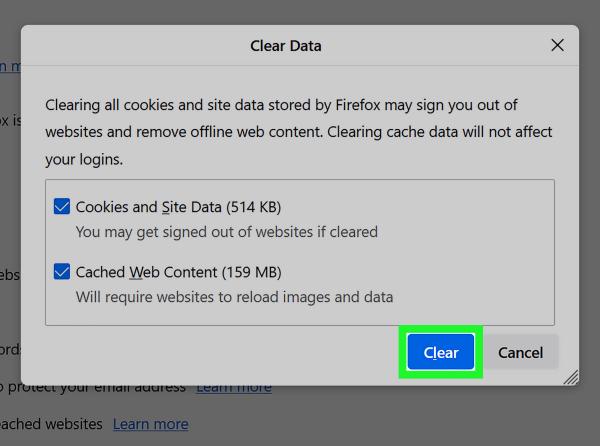
If your Windows browser is glitching or displaying “Unknown Network Error,” the first thing to do is purge the session data. Open Chrome or Edge and use Ctrl+Shift+Delete to clear cookies and hosted app data specifically for the last 24 hours. Alternatively, try the recovery from an Incognito window or a different device entirely. By using a fresh device or a clean browser profile, you avoid sending corrupted “trusted tokens” that might trigger a security block during the instagram password reset attempt.
Step2. Isolate Your IP Address and Network
Instagram often flags “automated behavior” if you attempt multiple resets on the same Wi-Fi. If you aren’t receiving the code, switch from your home Wi-Fi to a mobile hotspot or a different network. This provides you with a new local IP address. On your Windows machine, open the command prompt (cmd) and type ipconfig /flushdns. This ensures your computer isn’t trying to connect to an outdated or cached version of the Instagram recovery servers.
Open the Command prompt, and type:
ipconfig /flushdns
Step3. Verify Your Identity via “Need More Help?” and Biometrics
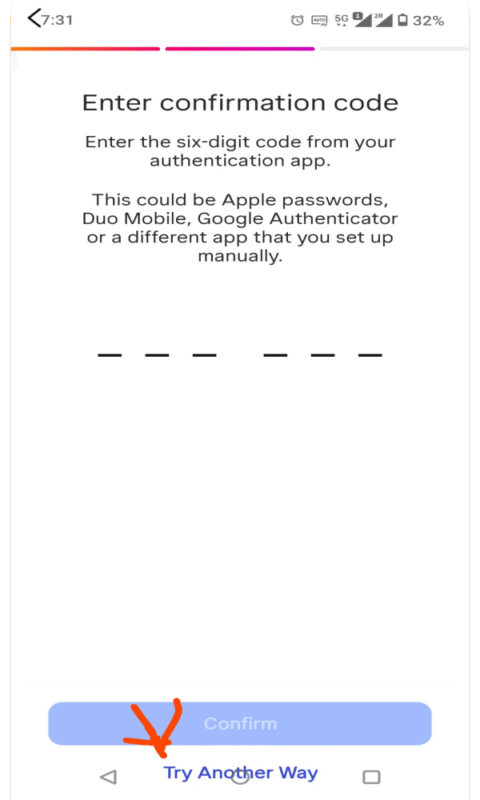
If the standard email reset fails or the link arrives expired, use the “Try another way” option on the mobile app. This is the most effective bypass for Windows users who have lost their local backup files. Select “Submit a Request” and choose the “Video Selfie” verification. This allows Instagram’s AI to compare your live movements with the photos on your profile. Once approved (usually within 24–48 hours), they will send a unique bypass link that ignores previous failed instagram password reset attempts.
When performing a Video Selfie, image clarity is your most important asset. If your camera settings are misconfigured or your lighting is poor, the AI may reject your submission. For a deeper dive into ensuring your camera captures the sharpest possible data for this step, check out our guide: “Why Does Instagram Make My Picture Blurry? Causes and Fixes“. Following those optimization steps will ensure the biometric scanner recognizes your facial features instantly, preventing the dreaded “Verification Failed” loop.
Step4. Search for “Ghost” Emails and SMTP Delays
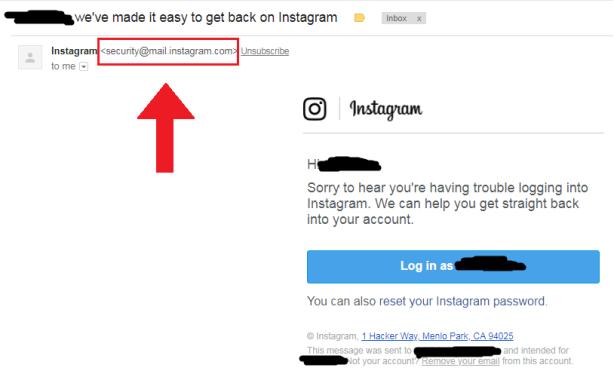
Sometimes Windows Mail or Outlook filters redirect a security link to a hidden folder like “Clutter,” “Other,” or even a local “Deleted Items” bin due to strict heuristic scanning. Do not just look in “Spam.” Search your entire mailbox for the keyword “Instagram” or the sender address [email protected]. If you find the email but the link is unclickable, copy and paste the URL directly into your browser’s address bar to bypass link-scanning security tools that might be stripping the recovery token.
Step5. Update Your System Time and SSL Certificates
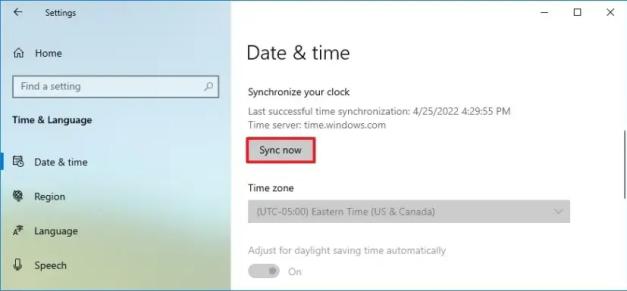
It sounds trivial, but if your Windows system clock is out of sync by even 60 seconds after a CMOS battery failure or a crash, the SSL security certificates used for the instagram password reset will fail to validate. Go to Settings > Time & Language and click “Sync Now” under the “Synchronize your clock” section. Ensure your time zone is correct; otherwise, the timestamp on the recovery link will be seen as “expired” the moment it hits your inbox.
Recovering the Vanished Files That Hold Your Access Codes
During my ordeal, the real panic set in when I realized my local text file containing backup security codes was gone. A system crash doesn’t just log you out; it can cause “silent” data corruption. Many people focus so much on the instagram password reset that they ignore the fact that their local drive might be failing or has suffered a directory error.
If you find that your browser profile, saved password lists, or local backup folders have disappeared after a crash, you need a way to scan the disk’s raw sectors. This is where I discovered WinfrGUI. While Microsoft offers a command-line recovery tool, it’s incredibly intimidating to use when you’re already stressed. WinfrGUI provides a much-needed graphical interface for that power. It allowed me to run a “Deep Scan” on my drive and pull back the deleted files and browser fragments that I thought were lost. It’s a vital safety net for any Windows user who values their data as much as their social access.
Troubleshooting FAQ
Q1: Is data still recoverable after a “Quick Format”?
Yes. A “Quick Format” only erases the file index, not the actual data. As long as you haven’t written new large files to the drive, your original data blocks remain intact. Use WinFR GUI to hunt for this “unallocated” data.
Q2: How should I prioritize my recovery steps?
The strategy is simple: secure your online identity first. Complete your instagram password reset on a separate, safe device like your phone. Once your accounts are locked down, turn your attention to your formatted drive to avoid accidental overwriting during the login process.
Q3: Why use WinFR GUI instead of other tools after a format?
Because this tool is built on Microsoft’s own recovery engines, it has a high success rate for finding specific file types like browser database files or images that were present before the format. It is deeply integrated with the Windows file system logic.
Q4: Can I recover my 2FA backup codes if the folder was deleted?
Yes. Deep Scan modes can often reconstruct .txt or .pdf files that were deleted. Since backup codes are usually small files, they are less likely to be fragmented and have a higher chance of a 100% recovery.
Q5: What if my Windows OS is unstable after the format?
If you suspect your system is still crashing, do not run the recovery from that OS. Connect your hard drive to another healthy PC as a secondary drive and run WinFR GUI from there. This prevents the “Live” OS from writing temporary log files over your deleted data.
Q6: How do I build “Digital Resilience” for the future?
My experience taught me that we cannot treat our online accounts and local files as separate worlds. A failure in one—like the inability to perform an instagram password reset—is often linked to a failure in the local file system. By using 2FA for accounts and a reliable tool like WinFR GUI for your hard drive, you create a “Defense in Depth” that ensures you can rebuild your digital footprint no matter what.
Final Summary
Recovery is as much about mindset as it is about technology. If you are struggling with an instagram password reset today, take a deep breath. Start with the browser basics, check your network, and move through the verification steps one by one. At the same time, take a moment to look at your Windows folders. If anything seems missing after your recent technical glitch, don’t wait for it to magically reappear. Download a utility like WinFR GUI and run a scan while the data is still fresh and recoverable. I managed to get my account back and my files restored by being methodical and using the right tools—and you can do the same. Your digital life is worth the effort.
🔗 More Tutorials:
 MyRecover
 FoneTool
