
Is Disk Drill Safe or a Scam? Real User Reviews

when I first came across Disk Drill, I was skeptical. Like many people dealing with unexpected data loss, I just wanted a solution that worked without putting my files—or my system—at risk. And when a tool claims it can recover everything for free, it naturally raises some eyebrows. So I decided to dig in.
As someone who’s worked in tech writing and tested dozens of recovery tools over the years, I’ve seen the good, the bad, and the overhyped. In this article,I’ll walk you through the real answer to the question “Is Disk Drill safe?”—whether it’s a legitimate tool or a scam, if it lives up to its promises, and how it compares to solid alternatives like WinfrGUI—which I’ve personally had good results with. If you’re here trying to decide whether to trust Disk Drill with your files, I’ve done the legwork so you don’t have to.
What Is Disk Drill?
Disk Drill is a popular data recovery program developed by CleverFiles, designed for both Windows and macOS users. It claims to help you recover lost data from hard drives, USB flash drives, SD cards, and more. Disk Drill offers a range of features, including:
- Quick and deep scan options
- Partition recovery
- File system support for NTFS, FAT32, exFAT, and more
- File preview before recovery
- Data protection tools
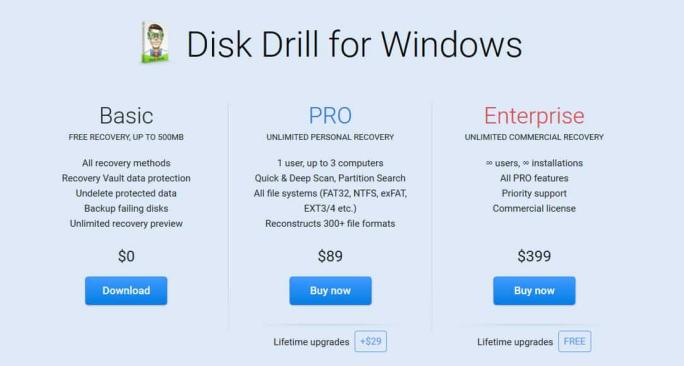
The software is available in two versions:
- Free: Can scan and preview files but limits actual recovery to 500MB (on Windows)
- Pro: Offers unlimited recovery and advanced features, but costs around $89
At first glance, it looks like a solid choice. But how safe is it really? Is Disk Drill safe to use?
Is Disk Drill Safe?
✔️Clean From Malware
I ran Disk Drill through VirusTotal and scanned it with several antivirus programs. The result? No malware, adware, or spyware detected. As long as you download it from the official CleverFiles website, it’s safe to install.
✔️Developed by a Legitimate Company
CleverFiles is a recognized software developer that has been active for over a decade. Disk Drill has been featured by major tech publications like TechRadar and PCWorld, which adds to its credibility.
✔️No Bundled Bloatware
Disk Drill doesn’t attempt to install unwanted toolbars or third-party software during setup. The installer is clean, and the UI is well-designed and professional.
✔️Requires Full System Access
Like all recovery tools, Disk Drill needs access to your drives—including system and external storage. While this is necessary for deep scans and recovery, it does raise a concern for privacy-sensitive users. The app does not send data to external servers, but be mindful of where you recover files to (never the original drive).
✔️Privacy and Data Protection
Data recovery tools inherently need deep access to your drives, including system and external drives, to scan and restore lost files. Disk Drill is no exception—it requests administrator permissions on installation and runtime. While this level of access is necessary, it’s important to be aware of the security implications. Disk Drill does not upload your files to any external servers; all scanning and recovery happen locally on your machine.
❓ Is Disk Drill a Scam?
Let’s be clear: Disk Drill is not a scam. It’s a legitimate and widely used recovery tool. However, some users feel misled because the free version is limited to scanning and previewing files. You’ll need to upgrade to actually recover most data beyond 500MB. This is a common business model in the data recovery industry, but it’s something to be aware of before downloading. Disk Drill also offers a refund policy, though some users report it can be difficult to get timely support. Again, this doesn’t make it a scam, but it’s worth noting if customer service is important to you.
A key safety tip: never save recovered files back to the same drive or partition you’re scanning, as this can overwrite the deleted data and reduce recovery chances. Instead, always use a separate external drive or partition for recovery.
Real User Reviews: What Are People Saying?

To get a balanced perspective, I reviewed user experiences across Reddit, Trustpilot, and community forums. Here’s what I found:
✔️Positive Experiences
- “Disk Drill recovered over 100 GB of lost family photos after an external drive crash.”
- “The deep scan took a while but found almost everything.”
Many users praised Disk Drill for its effectiveness in recovering large amounts of data, especially from challenging scenarios like formatted drives or accidental deletion. For example, one user shared how Disk Drill successfully recovered over 100 GB of precious family photos after an external hard drive failure—a recovery that many other tools failed to achieve. Others highlighted the value of the deep scan feature, acknowledging that although it can be time-consuming, it often uncovers files that simpler scans miss. Users also appreciated Disk Drill’s intuitive interface, which makes data recovery accessible even to those without technical expertise.
😐 Mixed Opinions
- “Free version only previews files—you have to pay to recover more than 500MB.”
- “The UI is beginner-friendly, but the recovery wasn’t perfect.”
A common point of contention revolves around the limitations of the free version. Several users noted that while Disk Drill allows full scanning and file preview for free, actually recovering files beyond the 500MB free recovery limit (on Windows) requires purchasing the Pro version. This paywall led some users to feel the software was less generous than competitors offering more free recovery capacity. There were also remarks about recovery results being inconsistent depending on the file type and damage severity. While Disk Drill performs well with many common file formats, recovery success can vary, which is typical for all recovery tools.
❌ Negative Feedback
- “I was disappointed that the free version didn’t actually recover much.”
- “Customer support was slow when I asked for a refund.”
On the less positive side, a subset of users expressed frustration with the limited functionality of the free version, feeling that the marketing could be clearer about the paid upgrade requirement. Some also experienced slow or unresponsive customer support, especially when seeking refunds or technical help. A few users reported that Disk Drill did not recover certain critical files, which could be due to the extent of corruption or overwriting—issues that no recovery software can fully overcome. These experiences underscore the importance of realistic expectations when dealing with data loss.
What About Alternatives Like WinfrGUI?
Across Reddit and various tech forums, many users recommend WinfrGUI as a reliable, free alternative to Disk Drill. Its appeal lies not only in being completely free but also in offering a safe, user-friendly recovery experience without compromising system integrity.
For Windows users especially, WinfrGUI stands out because it’s built on Microsoft’s official Windows File Recovery engine, combining trusted technology with an intuitive graphical interface. If you’re looking for an effective recovery tool without the limitations or costs of Disk Drill’s paid versions, WinfrGUI is definitely worth considering.
How Disk Drill Compares to Other Tools
Here’s how Disk Drill stacks up against other popular recovery software:
| Tool | Price | Platform | Ease of Use | Recovery Quality | Safe to Use | Free Recovery |
|---|---|---|---|---|---|---|
| Disk Drill | Freemium ($89 Pro) | Windows/macOS | Very user-friendly | High (varies) | ✅ Yes | ❌ 500MB limit |
| WinfrGUI | 100% Free | Windows only | Extremely simple | High (uses Microsoft’s WinFR engine) | ✅ Yes | ✅ Unlimited |
| Recuva | Free/Paid | Windows only | Beginner-friendly | Medium | ✅ Yes | ✅ Yes |
| EaseUS | Paid ($69+) | Windows/macOS | Very polished | High | ✅ Yes | ❌ Preview only |
Tips to Use Disk Drill (or Any Recovery Tool) Safely
1. Always download software from the official website.
This ensures you receive the authentic, unmodified version of Disk Drill without any hidden malware or unwanted programs.
2. Avoid pirated or cracked versions at all costs.
These unauthorized copies often contain malware or spyware that can compromise your system’s security and further endanger your data.
3. Do not install the recovery software on the same drive or partition where data loss occurred.
Installing on the affected drive risks overwriting the very files you aim to recover, reducing the chances of successful restoration.
4. Use a separate external storage device to save recovered files.
This prevents overwriting and maintains the integrity of your original data during the recovery process.
5. Consider trying reliable free alternatives like WinfrGUI before purchasing paid software.
Especially if budget constraints exist, WinfrGUI offers a safe, fully functional recovery experience based on Microsoft’s official recovery engine. Following these best practices will maximize your chances of successful data recovery while keeping your system secure.
Conclusion
So, is Disk Drill safe or a scam? From my hands-on experience and hours spent combing through user reviews, I can say with confidence: Disk Drill is safe, and it’s definitely not a scam. But it’s also not perfect. The free version feels a bit limited if you’re hoping to recover a large batch of files without paying. And while it performs well in many cases, results can vary depending on how and where your files were deleted. If you’re hesitant to invest right away or just want a simpler alternative that doesn’t come with a paywall, I’d genuinely recommend giving WinfrGUI a try. It’s free, reliable, and based on Microsoft’s own recovery engine—which gives me peace of mind as both a tech writer and a user. At the end of the day, your data is too valuable to risk. Whatever tool you choose, make sure it’s safe, reputable, and suits your recovery needs.
🔗 Also Read: Is WhatsApp Safe After the Latest Updates?[2025 Guide]
 MyRecover
 FoneTool
