
Wondershare Data Recovery vs. Other Tools: Which Is Best

When it comes to data recovery, selecting the right tool is essential to maximize your chances of recovering lost or deleted files. In this comparison, we examine Wondershare Data Recovery and four other popular tools: WinfrGUI, Recuva, Disk Drill, and EaseUS Data Recovery. We’ll explore the key functions, pros, cons, and give you a brief description of each tool to help you determine which one fits your needs.
Wondershare Data Recovery vs. Other Tools
| Feature | Wondershare Data Recovery | WinfrGUI | Recuva | Disk Drill | EaseUS Data Recovery |
|---|---|---|---|---|---|
| Platform | Windows, macOS | Windows | Windows | Windows, macOS | Windows, macOS |
| Free Version | Yes (limited) | Yes | Yes | Yes (limited) | Yes (2GB limit) |
| File Recovery Types | Photos, videos, documents | Photos, videos, documents | Documents, photos | Photos, videos, documents, partitions | Photos, videos, documents, emails |
| Deep Scan | Yes | Yes | Yes | Yes | Yes |
| Partition Recovery | Yes | No | No | Yes | Yes |
| Advanced Features | Yes | No | No | Yes | Yes |
| Pricing | Paid (from $69.95) | Free | Free (Pro: $19.95) | Paid (from $89) | Paid (from $69.95) |
| Ease of Use | High | High | High | Medium | High |
| Support | 24/7 support | Community forum | Email support | Live chat support | Email & phone support |
Wondershare Recoverit
It is a user-friendly software designed for recovering lost or deleted data from a variety of storage devices, including hard drives, USB drives, SD cards, and memory cards. It supports a wide range of file types and can restore data after system crashes, accidental deletion, partition loss, or formatting.
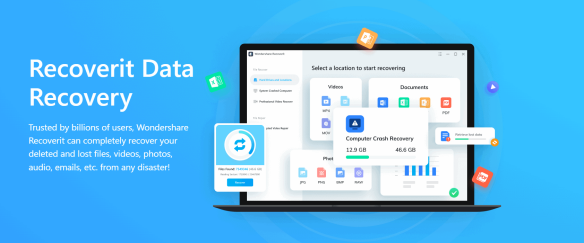
Key Functions:
- File Recovery: Recovers photos, videos, documents, emails, and more from a variety of devices.
- Deep Scan Mode: Provides advanced scanning algorithms to recover deeply deleted or lost files, even after formatting.
- Preview Files: Allows you to preview files before recovery to ensure you’re retrieving the right data.
- Supports Multiple File Systems: Works with FAT, NTFS, exFAT, and other file systems.
- Recover from Different Scenarios: Can recover data after accidental deletion, system crash, partition loss, or formatting.
Pros & Cons:
- ✔️ Comprehensive recovery options: Recovers a wide range of file types from multiple devices.
- ✔️ Easy-to-use: Offers a simple interface suitable for both beginners and advanced users.
- ✔️ Deep scan recovery: Capable of retrieving files from severely damaged or formatted drives.
- ❌ Paid software: Requires a purchase for full functionality.
- ❌ Slower deep scans: Time-consuming scans, especially on larger drives.
WinfrGUI
WinfrGUI is an open-source, free data recovery tool designed for Windows that allows users to recover files from formatted or corrupted drives. The tool offers both quick and deep scanning options and can be run as a portable version without the need for installation, making it a great tool for on-the-go data recovery.
Key Functions:
- File Recovery: Recovers files such as documents, images, videos, and archives from formatted or corrupted drives.
- Quick and Deep Scans: Offers two types of scans to find and recover files efficiently.
- Supports Various Storage Devices: Includes hard drives, SSDs, USB drives, and SD cards.
- Portable Version Available: No installation required; can run directly from a USB stick.
- Free and Open Source: Fully free to use, with no hidden costs.
Pros & Cons:
- ✔️ Free and open-source: No cost for users, and you can freely modify the software.
- ✔️ Simple interface: Easy to use for beginners with a minimalist design.
- ✔️ Portable: Can be run without installation, perfect for on-the-go recovery.
- ❌ Limited advanced features: Lacks some advanced options available in premium tools.
- ❌ No customer support: Being open-source, it doesn’t provide professional customer support.
- ❌ Performance issues on larger files: Can be slower with bigger file sizes and larger drives.
Recuva
Recuva is a free data recovery tool for Windows that is designed to recover lost files, photos, music, and other types of data. It offers both quick and deep scan options to ensure that data is recovered, even from severely corrupted drives. Recuva’s free version covers most basic recovery needs, but it also has a premium version with additional features.
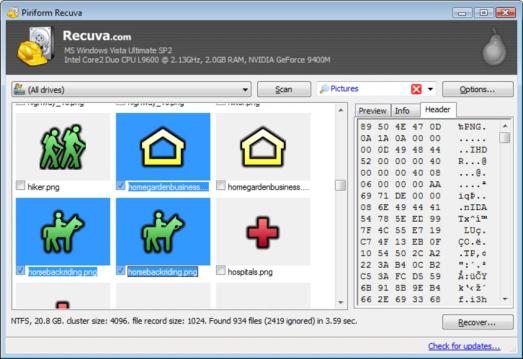
Key Functions:
- File Recovery: Recovers deleted files, images, music, and videos from hard drives, memory cards, USB drives, and even external storage devices.
- Deep Scan Mode: Aimed at recovering files from severely corrupted or formatted drives.
- Secure File Erasure: Recuva offers the option to securely overwrite files, making sure they can’t be recovered by others.
- Portable Version: Can be used directly from a USB stick without installation.
- File Preview: Offers a preview of recoverable files before performing the recovery.
Pros & Cons:
- ✔️ Free version available: Core recovery features are available without cost.
- ✔️ Simple to use: Designed for beginner users, making file recovery straightforward.
- ✔️ Portable: Can run without installation, useful for emergency recovery situations.
- ❌ Limited advanced features: The free version lacks some of the more powerful recovery tools.
- ❌ No macOS version: Only available for Windows users, limiting its appeal to macOS users.
- ❌ Slower recovery speeds: Deep scans and larger file recoveries can take more time.
Disk Drill
Disk Drill is a professional-grade data recovery tool available for both Windows and macOS. It offers a range of advanced features such as partition recovery, deep scanning, and disk health monitoring. Disk Drill’s free version allows you to recover up to 500MB of data, making it a good option for users with smaller recovery needs.

Key Functions:
- File Recovery: Recovers data from hard drives, memory cards, and external storage devices such as USB sticks.
- Partition Recovery: Can recover lost or damaged partitions, which is particularly useful when partitions are accidentally deleted or corrupted.
- File Preview: Lets you preview files before recovery to ensure the data you’re recovering is the correct one.
- Disk Health Monitoring: Provides a feature to monitor the health of your drives to prevent data loss in the future.
- Supports Multiple File Systems: Works with NTFS, FAT32, exFAT, and HFS+ file systems.
Pros & Cons:
- ✔️ Cross-platform: Available for both Windows and macOS.
- ✔️ Advanced recovery features: Can recover from lost partitions, damaged file systems, and more.
- ✔️ Preview files before recovery: Allows you to check files before committing to full recovery.
- ❌ Paid software for full features: The free version offers limited recovery capabilities, with a hefty price for the full Pro version.
- ❌ Complex interface: Might be overwhelming for beginners due to its wide range of options.
- ❌ Slow scanning for large volumes: Can take a long time to recover large volumes of data.
EaseUS Data Recovery
EaseUS Data Recovery is a feature-packed software available for both Windows and macOS that enables you to recover a wide variety of file types from various devices. With its intuitive interface and support for deep scanning, EaseUS can recover data from formatted, damaged, or corrupted drives and lost partitions.
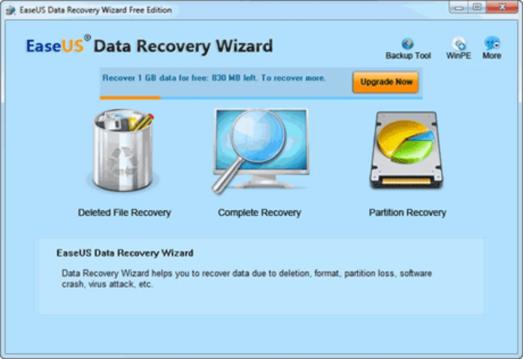
Key Functions:
- File Recovery: Recovers files, photos, videos, and documents from internal and external storage devices.
- Partition Recovery: Recovers lost or damaged partitions, even from accidentally formatted drives.
- Deep Scan Mode: Offers an advanced scan that is capable of recovering deeply lost files.
- Preview Before Recovery: Allows you to preview recoverable files to ensure the data you’re restoring is the correct one.
- Supports Various File Types and Devices: Compatible with a range of file types and can recover data from hard drives, USB drives, memory cards, and even emails.
Pros & Cons:
- ✔️ Comprehensive recovery options: Supports both file and partition recovery, along with deep scans.
- ✔️ User-friendly: Easy-to-use interface makes it accessible for users with no technical experience.
- ✔️ Flexible pricing: Offers a free version with a 2GB data recovery limit, which is ideal for basic recovery needs.
- ❌ Paid software for full recovery: Full recovery features require purchasing the Pro version.
- ❌ Can be slow with large files: Performance may lag when scanning larger volumes of data.
- ❌ Pricing on the higher side: The Pro version is priced higher compared to other tools in this list.
Conclusion: Which Tool Is Best?
Choosing the right data recovery tool boils down to what you need. If you’re looking for an easy-to-use solution for recovering a wide variety of files from multiple devices, Wondershare Data Recovery might be your best bet, despite its cost. For those seeking a free, open-source option, WinfrGUI provides an excellent, portable recovery solution, though it lacks advanced features.
On the other hand, Recuva is a great choice if you prefer a free tool with simple features, while Disk Drill stands out with
Also Read👉How to See Recently Deleted Files on Windows: 7 Easy Tips
 MyRecover
 FoneTool
